
Attacking Google Cloud — Part 7 of 7 · a series by Zeynep Çelik.
Getting access is easy; keeping it past a key revocation and an incident-response team is the craft. GCP’s best persistence abuses intended behavior — so a CVE scan can’t see it, and only configuration and audit review can.
Series finale · every nest below is configuration abuse, not an exploit · each doubles as a defender’s audit item.
Initial access is usually noisy — a leaked key, a public bucket, a token that fell into CI logs. But whoever comes in noisy tends to get caught noisy. The part of an operation that actually decides its fate is what you do after the first foothold, because defence eventually notices the sizzling entry point and closes it. Persistence is your answer to a simple question: when that first door slams shut, am I still inside? In GCP the strongest answers don’t look like malware. They look like ordinary configuration, which is exactly why scanners miss them and why each one below is also a line item on the defender’s checklist. ATT&CK T1098 · T1136.003 · T1546 · T1537
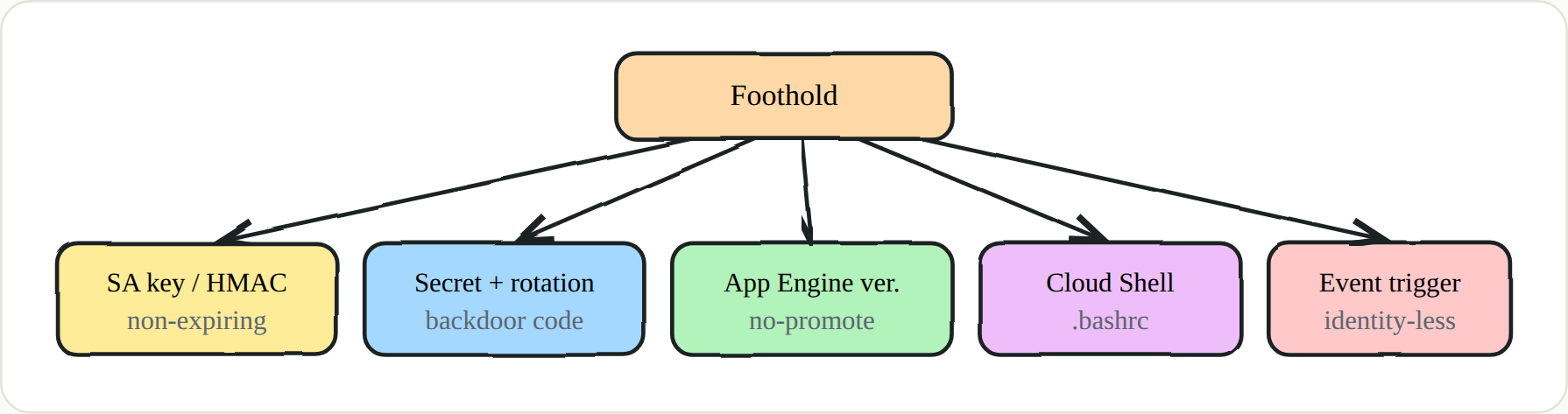 Five nests — none is an exploit, all are configuration abuse
1 · Long-lived credentials (not just JSON)
Everyone reaches for a service-account JSON key first, and it never expires — but it’s also the noisiest option, because CreateServiceAccountKey lands squarely in the audit log. The subtler variants are what keep you in quietly. A Cloud Storage HMAC key gives you S3-interop credentials for the same SA that most detection rules never look at and that work with any generic S3 tool. Granting yourself tokenCreator on a strong SA leaves a binding, not a file, and lets you mint tokens on demand. And a narrow custom role placed high in the tree draws far less attention than adding owner anywhere.
1
2
3
gcloud storage hmac create SA@PROJECT.iam.gserviceaccount.com    # S3-interop creds
gcloud iam service-accounts add-iam-policy-binding STRONG-SA@PROJECT.iam.gserviceaccount.com \
  --member="user:you@attacker.tld" --role="roles/iam.serviceAccountTokenCreator"
2 · Secret Manager — a two-tier nest
Secret Manager looks harmless because it only stores data, which is exactly why it’s such good ground. There are two tiers. The quiet one is simply granting your principal roles/secretmanager.secretAccessor on a secret that holds a privileged credential — a resource-level binding that most project-level reviews skip right over. The deeper one is hijacking rotation. In GCP, rotation isn’t automatic like KMS; it’s driven by a Pub/Sub message to a Cloud Function you can quietly backdoor. Add a few lines that exfiltrate each new value, and the secret keeps rotating for real — nobody sees an anomaly — while every fresh version also lands with you. ATT&CK T1556 · T1078.004
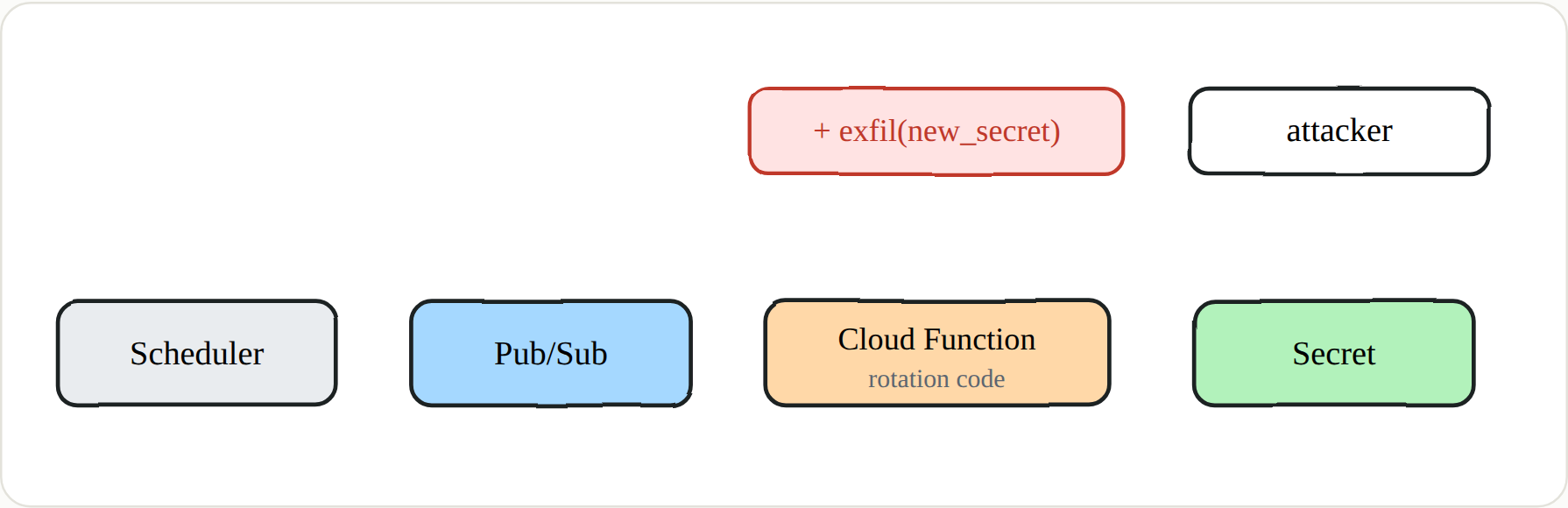 Hijack the rotation code and every “rotated” secret lands with you too
3 · App Engine’s version memory
App Engine keeps every version you deploy, and each stays reachable at its own URL. The default appspot SA is editor, and the source lives in the staging.PROJECT.appspot.com bucket. Put those together and you get a lovely trick: deploy a backdoored version with --no-promote, then push the clean code back as the live version. The storefront everyone sees is spotless, while your backdoor sits at its own version URL with zero traffic — fully alive, invisible unless someone knows to look. ATT&CK T1505
1
2
3
gcloud app versions list                                   # every version + traffic split
gcloud app deploy --no-promote --version=v-legit-2         # deploy without moving traffic
# → v-legit-2-dot-default-dot-PROJECT.r.appspot.com stays callable, 0 traffic
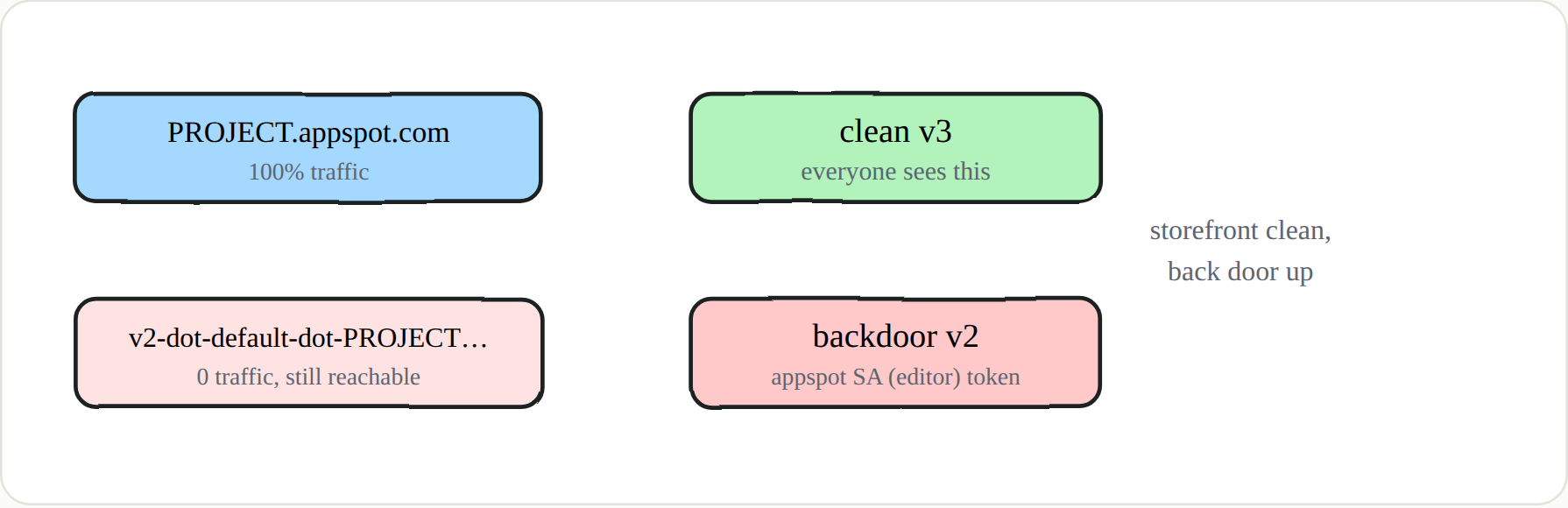 Deploy without promoting → look clean, keep the backdoor at its own URL
4 · Cloud Shell & 5 · identity-less triggers
Cloud Shell’s ~/.bashrc and ~/.customize_environment hooks (Part 6) give you logless, user-bound persistence that refreshes a real human’s token on every login. And the sneakiest category of all needs no stolen identity to revoke: an event-driven Cloud Function on a bucket or Pub/Sub trigger running as the editor default SA, a log sink quietly piping audit logs to a bucket or topic you control, or a Cloud Scheduler job that mints and ships a token on a timer. Each is invoked by the organization’s own legitimate activity, so there’s no credential for anyone to rotate away.
🔑 Key points
- Prefer bindings and behavior over files. HMAC keys and self-granted
tokenCreatorbeat a JSON key on stealth.- Rotation is your friend. Backdoor it and the secret keeps “rotating” while you collect every value.
- Keep a spare door at its own URL — an App Engine version — so the live app looks clean.
- Identity-less persistence survives credential revocation — event triggers, log sinks, and schedulers have no key to pull.
- None of this is a CVE — scanners miss it, so configuration and audit review are the only defence.
🔑 Detection & the series wrap-up
Watch for
CreateServiceAccountKey,CreateServiceAccountHmacKey, tokenCreator/ownerSetIamPolicy, functionUpdateFunction, App EngineCreateVersion, and new log sinks. But the deeper defence is everything this series pointed at, in one breath: disable SA-key and HMAC creation via org policy and move to Workload Identity; inventory owner/editor/tokenCreator/actAs with Cloud Asset Inventory; enable Data Access logs on Storage, Secrets, and BigQuery; strip editor from the default SAs; delete stale App Engine versions; and turn off Cloud Shell if it isn’t used. Knowing where an attacker likes to hide tells you exactly where to look — which is the whole point of thinking like one.
End of series. Attacking Google Cloud — 7 parts. If identity still doesn’t feel like the perimeter, start again at Part 1.