
Attacking Google Cloud — Part 3 of 7 · a series by Zeynep Çelik.
Turn “I have a foothold” into a map. Establish position, read IAM in three layers, then hunt the credentials that let you become someone more powerful.
The enumeration core · grey/white-box · every command below is read-only unless noted.
Most of the “where do I even begin?” paralysis you feel staring at a huge GCP org is really a missing order of operations. There is one, and it’s short: first work out exactly who you are and where you’re standing, then read the trust graph that IAM describes, then go find the forgotten credentials that quietly upgrade you from a viewer into an owner. Follow that sequence and hundreds of projects stop being noise and become a funnel — each step narrowing the next. ATT&CK T1580 · T1526 · T1069.003
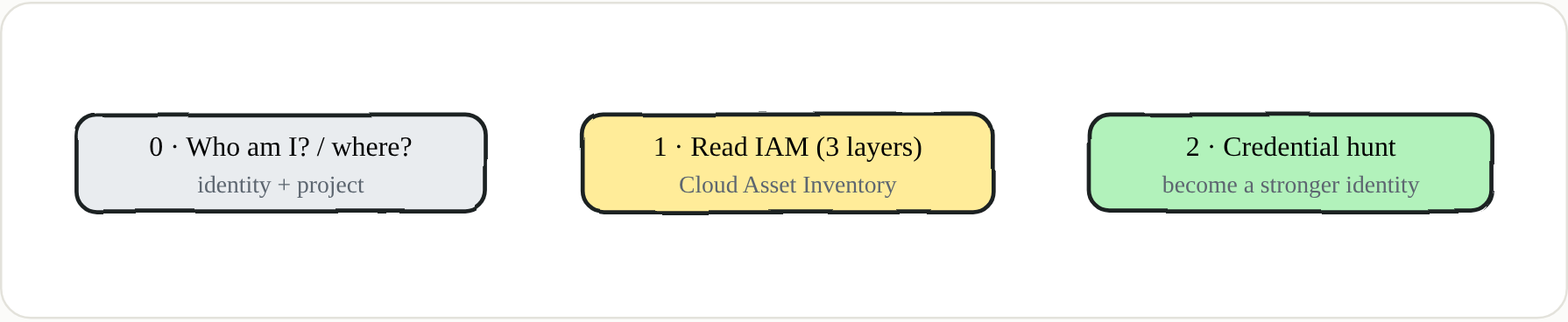 Three moves, in order — each one tells you what to do next
Step 0 — establish position
Every API call routes through the project you’ve configured, and it’s billed and authorized there. A permission can fail in one project and succeed in another where the same API is enabled — so the very first thing is to know who you are, what your token can do, and which project you’re pointed at.
1
2
3
4
gcloud config list ; gcloud auth list
TOKEN=$(gcloud auth print-access-token)
curl -s "https://www.googleapis.com/oauth2/v3/tokeninfo?access_token=$TOKEN"   # whose token, what scopes
gcloud projects list ; gcloud projects get-ancestors PROJECT_ID
Step 1 — org-wide IAM in one query (Cloud Asset Inventory)
The naive approach is to walk project by project with get-iam-policy. Don’t. Cloud Asset Inventory answers “where is dangerous access?” across the entire organization in a single query, and it’s the fastest way to find the bindings that matter before you spend hours in the weeds.
1
2
3
4
5
6
gcloud asset search-all-iam-policies --scope=organizations/ORG_ID \
  --query='policy:(roles/owner OR roles/editor OR roles/iam.serviceAccountTokenCreator)'
gcloud asset search-all-resources --scope=organizations/ORG_ID
gcloud projects get-iam-policy PROJECT_ID
gcloud iam service-accounts list --project=PROJECT_ID
gcloud iam roles list --project=PROJECT_ID --show-deleted       # custom roles
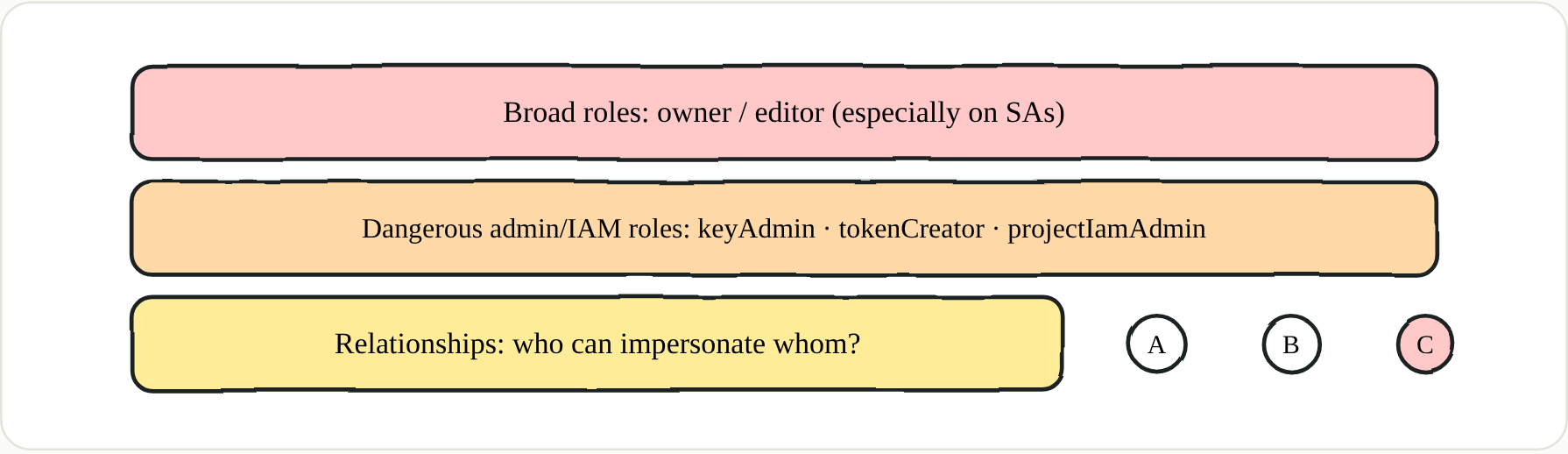 IAM isn’t a single list — read it as three layers
🔑 Key points — read IAM in three layers
- Broad roles —
roles/owner,roles/editor; doubly alarming on a service account, which can’t push back or notice.- Dangerous admin/IAM roles —
iam.serviceAccountKeyAdmin,iam.serviceAccountTokenCreator,iam.securityAdmin,resourcemanager.projectIamAdmin,secretmanager.admin,storage.admin,cloudfunctions.admin,run.admin.- Relationships — who can impersonate whom, who can
actAswhat. Escalation lives in this graph; automate it withPurplePanda.
🔑 Definition — testIamPermissions
An API method (
projects.testIamPermissions, plus per-resource variants for buckets, SAs, and so on) that answers a narrower but crucial question: of a list of permissions you hand it, which ones do you actually hold on this resource — without needing read access to the policy itself. Enumeration tools brute-force it to map your real, effective privileges, which is often very different from what the visible bindings suggest. Google’s owngcp_scanneris built around this.
Step 2 — credential hunting
IAM tells you who is authorized. But in most real environments the fastest path forward isn’t a permission you already have — it’s a credential someone forgot to clean up, sitting in a bucket or a pipeline, that belongs to a much stronger identity. The trick is to overlay two maps: “who is authorized” from your IAM read, and “whose credentials can I actually get my hands on” from hunting. The real attack paths live in the intersection.
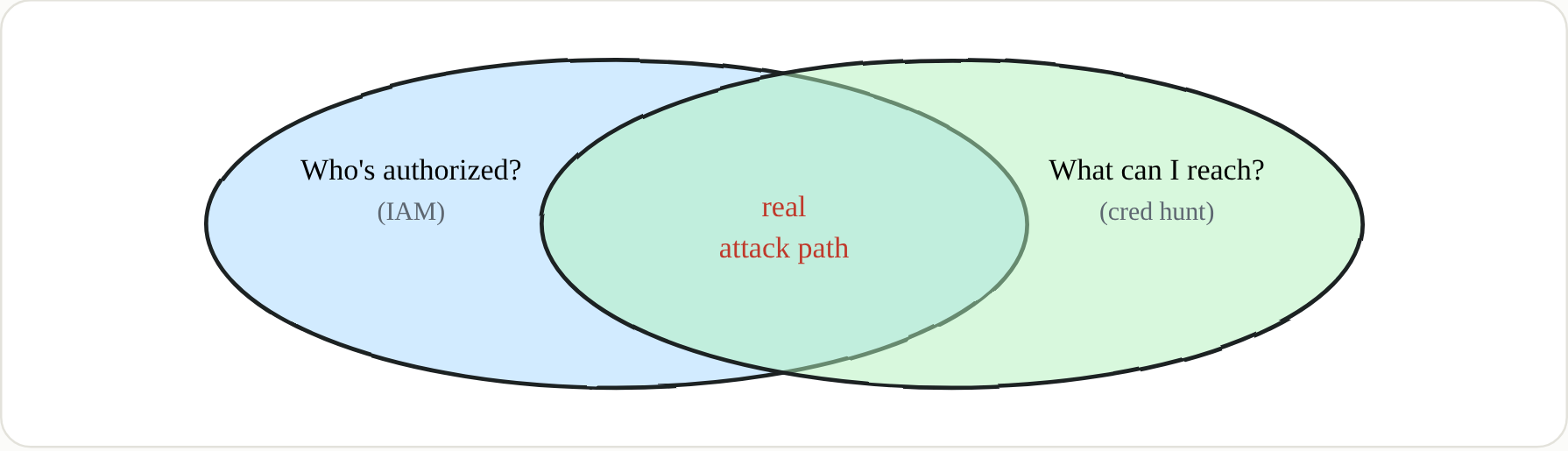 Privilege and access only mean something when they overlap
| Where | What you find | How |
|---|---|---|
| Cloud Storage buckets | SA JSON keys, .tfstate, PEM, backups, source | gsutil ls -r; GCPBucketBrute for public |
| Terraform state | Plaintext secrets, tokens, DB creds, SA keys, GKE CA | search buckets for *.tfstate |
| Secret Manager | Anything — check all versions | gcloud secrets versions access |
| VM metadata / startup script | Plaintext passwords, tokens, SSH keys | instances describe; metadata server |
| Serverless env vars | API keys, DB creds hard-coded | functions/run describe |
| Compromised host FS | SA keys, gcloud creds, refresh tokens | regex "type": "service_account" |
1
2
3
4
5
6
gsutil ls -r "gs://*" 2>/dev/null | grep -Ei '\.tfstate$|\.json$|\.pem$|id_rsa'
for s in $(gcloud secrets list --format='value(name)'); do
  echo "== $s =="; gcloud secrets versions access latest --secret="$s"; done
gcloud functions describe FN --format='value(environmentVariables)'
gcloud run services describe SVC --format='value(spec.template.spec.containers[0].env)'
gcloud compute instances describe VM --format='value(metadata.items)'
🔑 Key points — credential hunting
- Terraform state is the single richest target — it stores resolved values in plaintext: GitLab PATs, Kafka creds, SA keys, GKE CA certs.
- Secret versions matter — a rotated secret’s previous version may still be accessible and still valid on some downstream system.
- SA keys have a fixed JSON shape — regex-hunt every compromised host and repo for
"type": "service_account".- Reading secrets is often unlogged — if Data Access logs are off you leave no trace (which is also your finding to report).
🔑 Blue team
Enable Data Access logging on Storage, Secret Manager, and BigQuery so reads are visible; keep Terraform state in a locked-down, encrypted backend and scan it for secrets in CI; alert on bulk
secrets.versions.accessand unusual patterns ofstorage.objects.get; and periodically export Cloud Asset Inventory to diff who holds owner/editor/tokenCreator over time.
Next in the series → Part 4 · Service Account Impersonation & IAM Privilege Escalation