
Attacking Google Cloud — Part 1 of 7 · a series by Zeynep Çelik.
Before a single command, the shift that reorders everything: in the cloud you don’t hunt hosts, you hunt identities. This opener gives you the mental model, the loop, the vocabulary, and the very first moves the rest of the series builds on.
Series opener · grey/white-box oriented · assumes authorized testing · every technique in this series abuses intended platform behavior, not a 0-day.
Testing a cloud is not testing a network with a different logo on it. In a classic internal test you think in hosts, ports, and services; the perimeter is a firewall and the crown jewels are usually domain admin. Compromise flows through unpatched software and misconfigured shares, and you spend your time in Nmap output and Active Directory. In Google Cloud almost none of that shape survives. The “network” is a thin veneer over a giant, multi-tenant API. You will rarely, if ever, exploit a memory-corruption bug in Google’s infrastructure — that half of the world is Google’s responsibility under the shared responsibility model. What you attack is everything the customer builds and configures on top of it: identities, IAM bindings, service settings, exposed workloads, and the secrets people forget in buckets and pipelines.
That single shift reorders your whole priority list. The center of gravity moves from the host to the identity. A stolen OAuth token, a leaked service-account key, or a role that’s a little too generous will carry you further than any exploit in your kit. So the question you ask at every step is not “what can I run on this box?” but “whose identity am I holding right now, and what can that identity become?” Everything else in this series — enumeration, escalation, lateral movement, persistence — is just the mechanics of turning one identity into a more powerful one.
🔑 Definition — Shared Responsibility Model
Google secures the physical hardware, the hypervisor, and the internals of managed services (“security of the cloud”). The customer secures their identities, their data, their configuration, and who gets access (“security in the cloud”). A cloud penetration test lives almost entirely in the second half. Attacking the first half — the GCP infrastructure itself, hypervisor escapes, other tenants, 0-days in Google’s stack — is out of scope for a normal engagement and explicitly against the provider’s testing policy.
Where your work actually happens: the resource hierarchy
Before the loop, one structural fact you must internalize, because it governs how access flows. GCP resources live in a strict tree: an Organization at the top, optional Folders beneath it, then Projects, and finally the resources themselves (VMs, buckets, service accounts, databases, functions). IAM is inherited downward: a binding granted at the Organization or a Folder silently applies to every project and resource underneath it. This is why a single, quiet grant high in the tree can be worth more than owner on one project — and why it’s such a common blind spot for defenders.
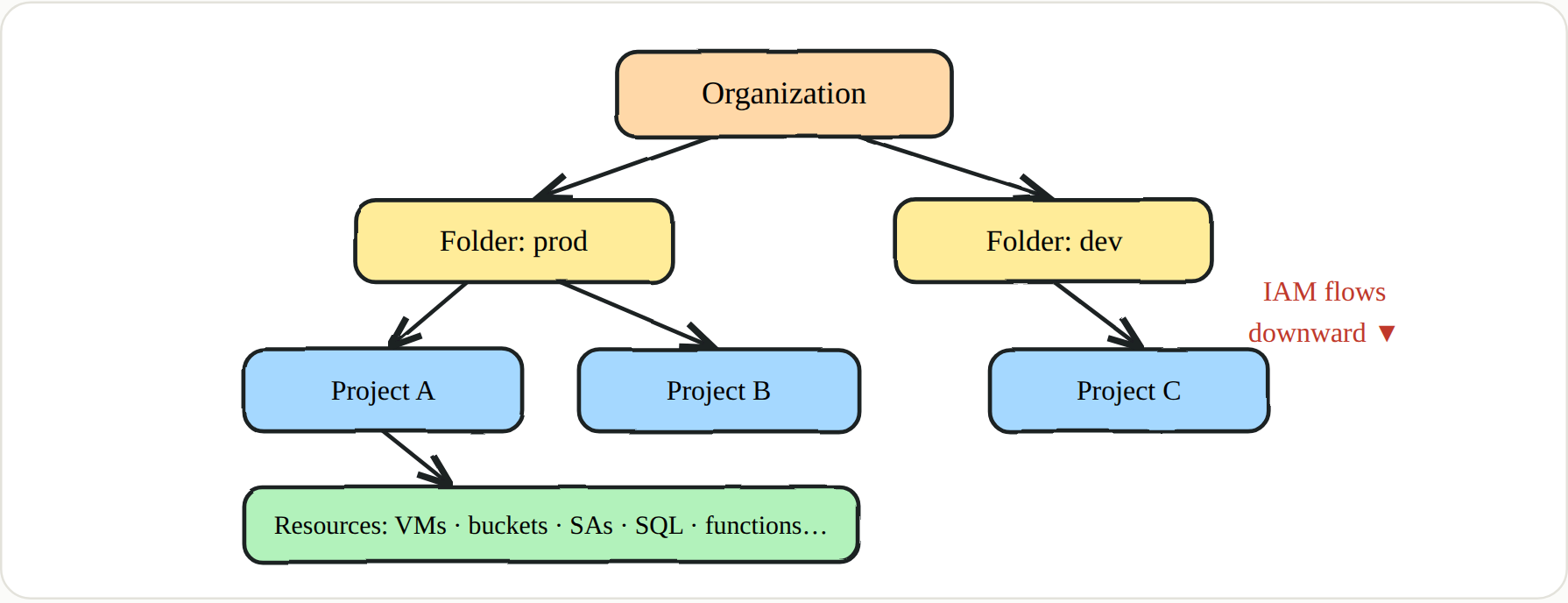 A binding at Org or Folder is inherited by every child below it
The engagement loop
A GCP engagement is a loop, not a linear checklist. Each pass feeds the next. What you enumerate reveals identities. The identities you can actually reach let you escalate. Escalation unlocks new services and new data. Those services yield new credentials, which drop you back at the top of the loop — except now you’re running it one privilege level higher. Good operators run this loop deliberately, noting after every lap what new identity they hold and what it just made reachable.
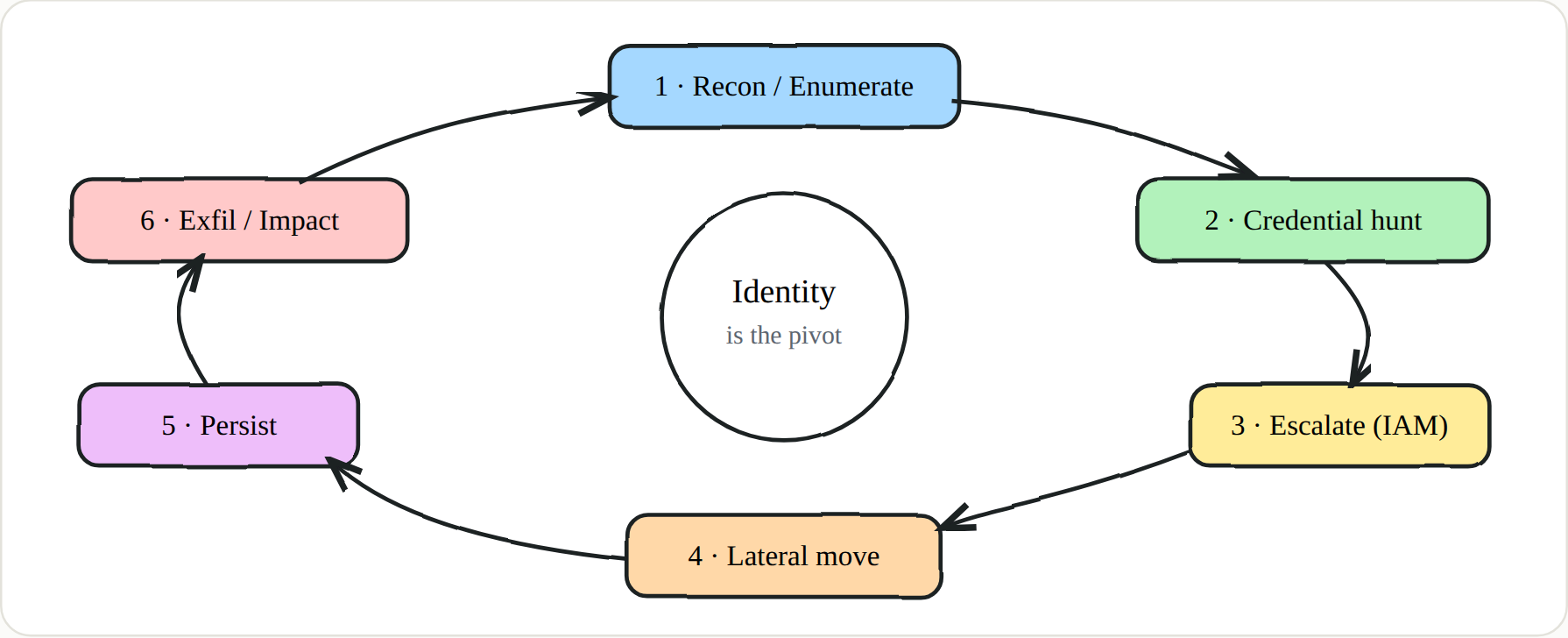 Every lap raises your privilege; identity is what carries between laps
🔑 Key points — the mindset
- Identity > exploit. Your best “payload” is usually a token or an over-permissioned service account, not a CVE.
- Everything is an API. Console,
gcloud, and Terraform all hit the same REST endpoints — learn to read the API, not just the CLI.- Projects are billing + trust boundaries. A call routes through the project you configured; a permission that fails in one project may succeed in another where the API is enabled.
- IAM is inherited downward. A binding at the org or folder level silently applies to every project beneath it.
- Scopes ≠ IAM. Access scopes limit a VM’s token but not a real credential — don’t confuse the two.
- Read logs as an attacker. Where Data Access logging is off, you’re invisible; that gap is both your opening and the defender’s finding.
- Stay in scope. No attacks on GCP infrastructure, other tenants, or destructive actions unless the Rules of Engagement explicitly allow them.
🔑 Definition — Black / Grey / White box
Black box — you start from the open internet with no credentials: OSINT, public bucket and appspot discovery, leaked keys.
Grey box — you’re given a low-privilege identity (a user, or a service-account key). This is the most common and most productive cloud setup, and it’s what this series assumes.
White box — you additionally get read access to configuration, IAM exports, and architecture diagrams — ideal for coverage and for the defender’s own review.
The identity model — humans live outside GCP
One more foundation before the vocabulary. Unlike AWS, GCP does not store its human users and groups inside IAM. They live in Google Workspace (or Cloud Identity); IAM merely grants those external identities access to GCP resources. The identity GCP natively owns is the service account — a non-human principal used by workloads. Understanding this split matters because it changes where you look: users and groups are enumerated through Workspace-adjacent APIs and through the bindings they appear in, while service accounts are first-class GCP objects you can key, impersonate, and attach.
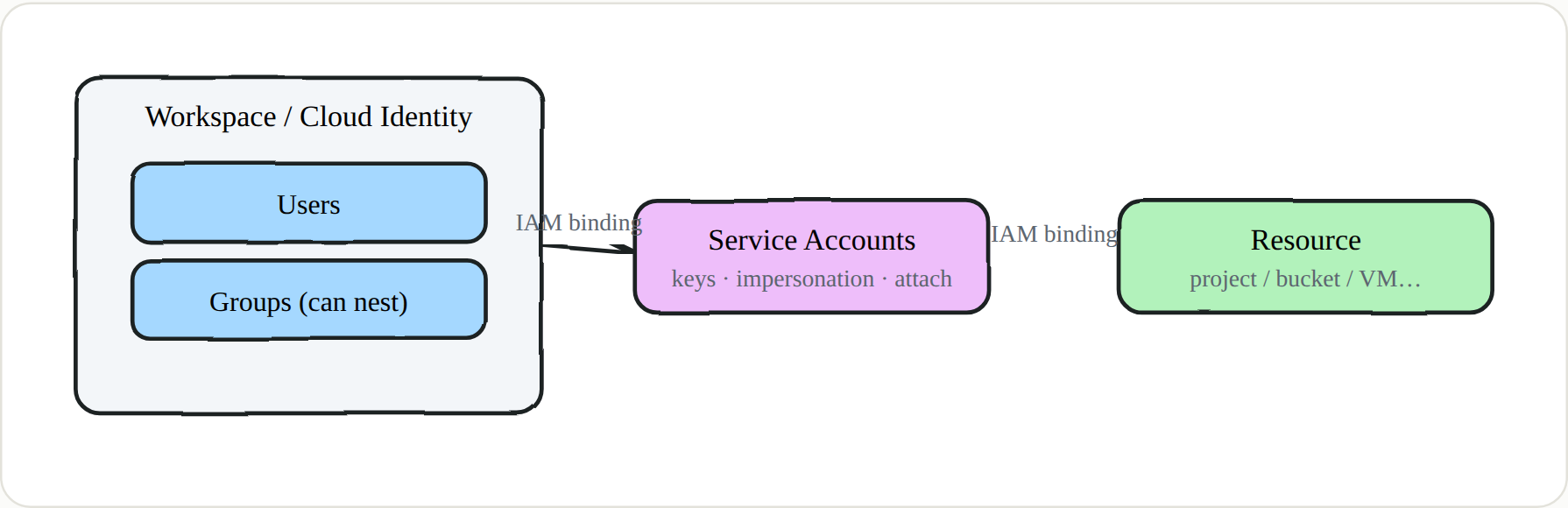 Humans come from Workspace; SAs are GCP-native — both reach resources through IAM bindings
The vocabulary you must own
Half the confusion in GCP work comes from sloppy words. Pin these down; the rest of the series leans on every one of them.
Principal (member / identity) — Anything that can be granted access: a user (user:alice@corp.com), a group, a service account, a whole domain, or a special set like allUsers / allAuthenticatedUsers.
Service Account (SA) — A non-human identity used by workloads (name@PROJECT.iam.gserviceaccount.com). It has no password; it authenticates with keys, with impersonation, or by being attached to a resource. Roughly AWS’s IAM role — with big differences we cover in Part 4.
IAM Policy / Binding / Role / Permission — A policy is the set of bindings on a resource. A binding = a role + one or more members (+ an optional condition). A role bundles permissions; a permission is service.resource.verb — e.g. compute.instances.create.
Role types — Basic (legacy, coarse): owner / editor / viewer. Predefined: granular and service-scoped (e.g. roles/storage.objectViewer). Custom: an explicit permission set you define at org or project level.
Access Scope — A legacy OAuth-scope cap applied to the token a GCE VM gets for its attached SA, independent of IAM. cloud-platform means “all APIs.”
Metadata Server — 169.254.169.254 / metadata.google.internal — hands a workload its instance data and its attached SA’s token. Requires the header Metadata-Flavor: Google.
ADC — Application Default Credentials — The credential-discovery chain client libraries use: the GOOGLE_APPLICATION_CREDENTIALS env var → gcloud user creds → the metadata server. Knowing the order tells you where to find or plant credentials.
Impersonation — One principal minting a token as a service account through the IAM Credentials API (generateAccessToken, signJwt, generateIdToken), gated by roles/iam.serviceAccountTokenCreator.
Domain-Wide Delegation (DWD) — A Workspace grant that lets a service account impersonate Workspace users (Gmail, Drive, Admin). The most dangerous bridge from GCP into Workspace.
Workload Identity Federation — Exchanging an external IdP token (GitHub Actions, AWS, OIDC) for short-lived GCP access without a service-account key — the recommended replacement for keys.
Organization Policy — Guardrails (constraints) at org/folder/project, separate from IAM — e.g. constraints/iam.disableServiceAccountKeyCreation. IAM says “who can”; Org Policy says “what’s allowed at all.”
Where every engagement begins: “Who am I?”
Before you list a single resource, answer one question: who are you, and from where? Everything downstream is interpreted relative to that answer. Your identity decides which bindings matter; your configured project decides which APIs even respond. A permission that fails in one project can succeed in another where the service is enabled — so sometimes the whole move is just gcloud config set project.
1
2
3
4
5
gcloud config list ; gcloud auth list            # active identity + configured project
TOKEN=$(gcloud auth print-access-token)
curl -s "https://www.googleapis.com/oauth2/v3/tokeninfo?access_token=$TOKEN"   # GCP "whoami"
gcloud projects list                              # projects you can see
gcloud projects get-ancestors PROJECT_ID          # walk up the org/folder chain
That tokeninfo call is your compass. Whenever you later steal or mint a token, this is how you learn who it belongs to and what scopes it carries — a reflex you’ll use dozens of times before an engagement is over. ATT&CK T1580 · T1526
🔑 How to read this series
Part 1 is the map. Part 2 gives you the hands-on plumbing — reverse shells, tunnels, exfil — because you need it the moment you land code execution. Part 3 turns “who am I?” into full recon and credential hunting. Parts 4–6 are the escalation and service-abuse core: impersonation, leaked API keys, and Cloud Shell. Part 7 is how you stay in. And in every part, a short blue-team section shows how the same behavior gets caught.
Next in the series → Part 2 · Getting a Shell Out of the Cloud: Reverse Shells, Tunnels & Exfil